

Lemmas
A lemma is a dictionary word: the headword a token is an inflected form of. Lemmas are what the Viewer's glossary is built from, and what links every attestation of a word across an edition.
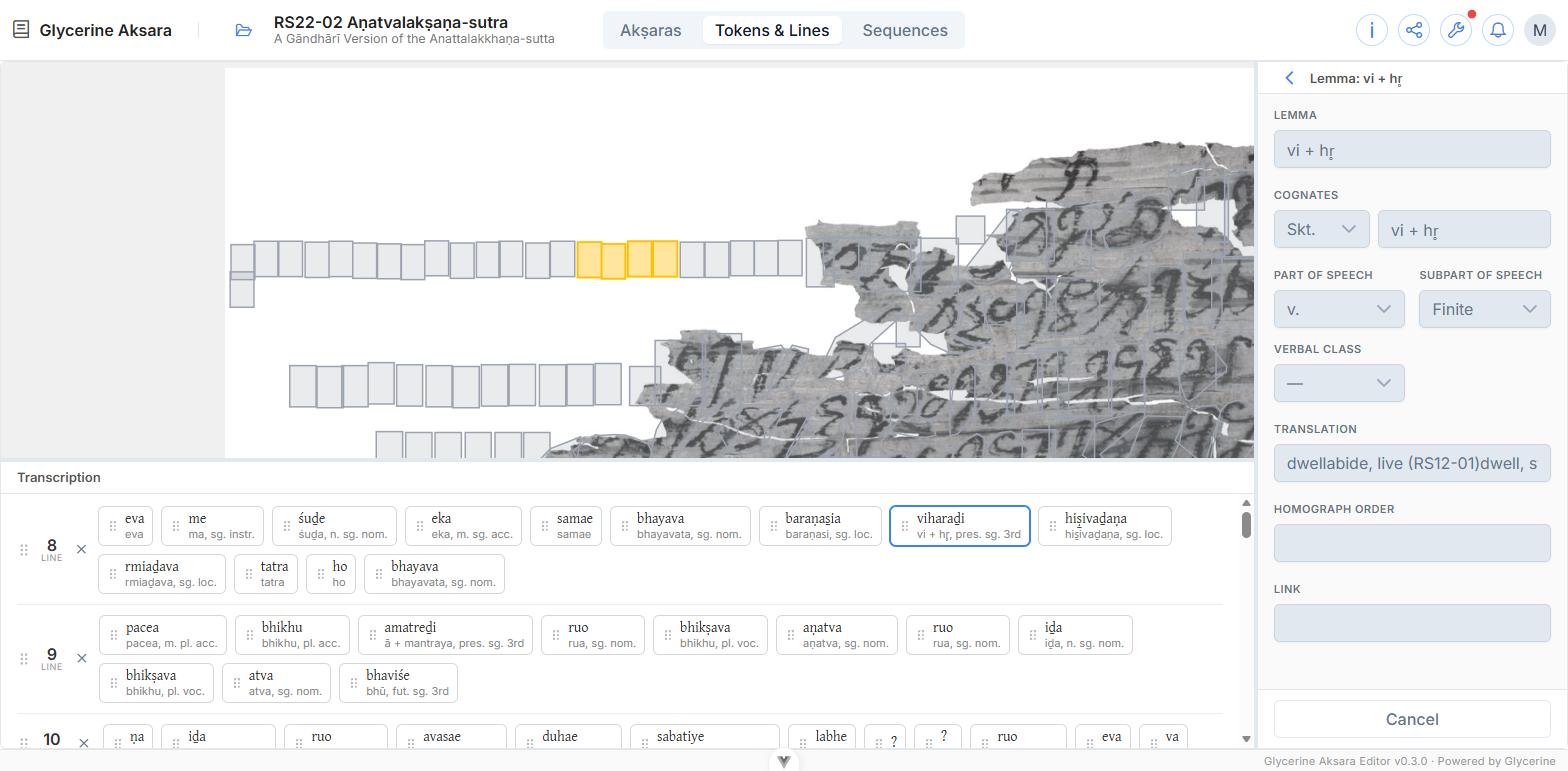
Choosing one
In the token inspector, the Lemma field searches the lemmas available to you — the canonical ones, plus your own, minus any that have been deprecated. Details opens the selected lemma; + New lemma creates one.
The dropdown searches in two modes, switched at the top of the open list:
| Lemma | Matches the Gāndhārī headword |
| Sanskrit | Matches the lemma's Skt. cognate, and labels each row with the form that matched |
Both match from the start of the value, not anywhere inside it. Sanskrit mode is what you want when you know the word but not how this edition spells it — it is the reason the cognate is a recorded value rather than a note. The mode stays where you put it as you work through one token after another; the search text does not.
The fields
| Lemma | The headword, in Gāndhārī |
| Cognates | Equivalents in other languages — a language (Skt.) and the form |
| Part of speech | noun, v., adj., pron., number, ind., ptc., and others |
| Subpart of speech | Where the part of speech has one — common/proper for nouns, Finite/Derivative for verbs |
| Gender | Nouns only |
| Verbal class | Verbs only |
| Translation | The gloss |
| Homograph order | Distinguishes identical headwords — the 1, 2 of *kar-*¹, *kar-*² |
| Link | A URL to an external dictionary entry, which the Viewer shows as a link |
Gender and verbal class appear only for the parts of speech that have them, and the subpart dropdown appears only where the chosen part of speech has subdivisions.
Changing the part of speech clears what it hides
Switching a lemma from v. to noun discards the verbal class, because that field no longer applies. Opening an existing lemma never does this — only your own change to the field.
Private, canonical, and the road between
This is the part of the Editor worth understanding before you create your fiftieth lemma.
A lemma you create is private to you. You can use it, edit it, and delete it; nobody else can see it or link a token to it. The form says so: Only you can use this lemma.
Submitting it for review offers it for promotion. While the request is pending the lemma is locked — the fields grey out, and a strip at the top of the form says when you submitted it. You can Withdraw request to get editing back.
If it is approved the lemma becomes canonical: available to every user, maintained by the administrators, and no longer yours. You cannot edit or delete it any more. The submit dialog spells this out before you commit.
If it is rejected the strip shows who reviewed it, when, and their note. Rejection is not always a criticism — a request is commonly turned down because an equivalent canonical lemma already exists.
A lemma is worth submitting when it is a real word of the language that other editions will meet again. Something ad hoc for one damaged passage is better left private.
Why your lemma's fields are greyed out
Because it is not yours. Opening a canonical lemma — or any lemma you did not create — shows it read-only, with no Save button. That is the normal state for most lemmas you will use.
Deprecated lemmas
A canonical lemma can be deprecated by an administrator. Existing tokens keep their link, and the lemma still displays, but it cannot be chosen for new tokens. A warning strip on the form says so.
Deleting a lemma
Only possible for your own, and only when no review is pending. Tokens using it lose the link — they are not deleted, they simply become unlemmatised, and the confirmation warns you.
Related lemmas
Below the Link field, Related lemmas lists every lemma sharing a Sanskrit cognate with this one — the same word under another Gāndhārī spelling. Each row gives the headword, the shared Skt. form, and the part of speech. Clicking one opens it; it does not change what the token is linked to.
Matching is on the cognate value, trimmed and case-insensitive, but diacritics count: evam and evaṃ are two Sanskrit words, not two spellings of one. A lemma with no Sanskrit cognate has no relatives and the section does not appear at all — which is the usual reason it is missing.
The list reflects saved cognates. A cognate you have just typed brings in no relatives until you save, and a lemma you have not yet created shows none.
The administrators' copy shows more
Here the list is drawn from what a token could be linked to, so deprecated lemmas are left out. The same list in lemma administration keeps them and tags them Deprecated, because nothing is being linked there and a deprecated relative is exactly what an administrator may need to act on.
Homographs are a separate matter: identical headwords are told apart by the Homograph order field above, which has nothing to do with cognates.