

The Workspace at a Glance
The Editor is one screen: a header, and three panes that always keep their places.
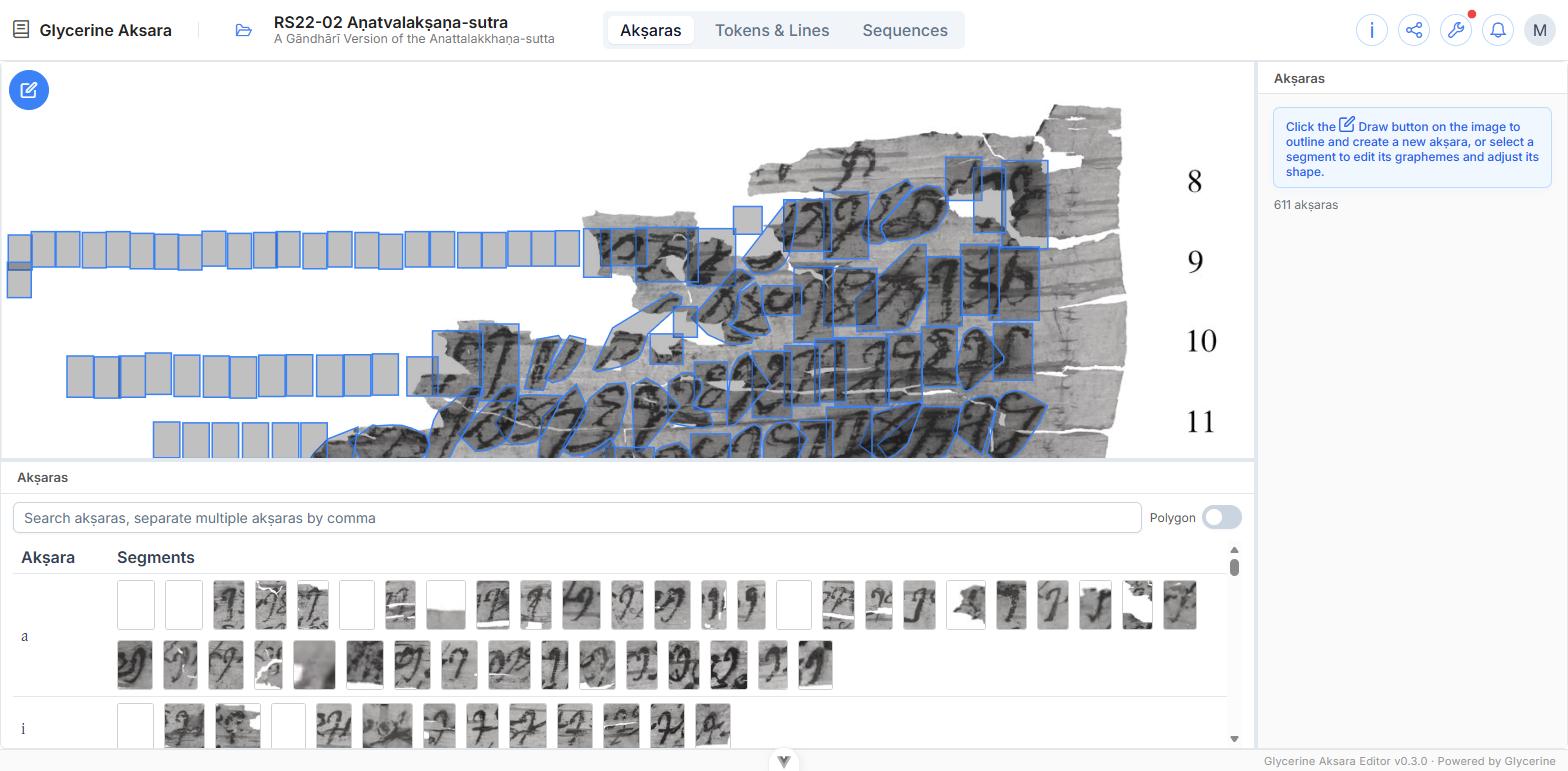
- Top left — the image. The manuscript, deep-zoomable, with every akṣara of the current edition outlined on it.
- Bottom left — the akṣara pane. All currently outlined akṣara segments.
- Right — the inspector. Whatever you currently have selected.
All three dividers can be dragged.
The three modes
The switch in the middle of the header is the most important control in the Editor. It changes what the bottom and right panes contain — and, with them, what a click on the image means.
| Mode | Bottom pane | Right pane | Clicking the image |
|---|---|---|---|
| Akṣaras | The akṣara table, one row per sign | The akṣara editor | Selects one akṣara to edit |
| Tokens & Lines | The transcription, line by line | The token inspector | Picks akṣaras to build a word from |
| Sequences | The sequence tree | The sequence inspector | — |
The image pane never changes place, but the outlines on it are recoloured to suit the mode. In Tokens & Lines, for instance, they are shaded by how much of each akṣara has already been used by a word.
Switching modes clears the current selection, deliberately — a selected akṣara and a selected token are different kinds of thing. If you have unsaved changes, you are asked before the switch goes through.
The header
Left — the folder icon opens Manage, where texts, editions, images, and collections live. Beside it, the text you have open and, under it in smaller type, the edition.
Right —
| Control | What it does |
|---|---|
| i — Edition properties | Jumps straight to this edition's form in Manage |
| Share | Opens the edition in the Viewer, or its report |
| Wrench | Admin menu: lemma administration and ink masks — administrators only |
| Bell | Notifications |
| Avatar | Change password, log out |
Saving
Nothing in the Editor saves as you type. Each inspector has its own Save and Cancel, and until you press Save the change exists only on screen.
Anything that would throw a draft away — switching mode, switching edition, closing Manage — stops and asks first.