

Glossary View
The glossary lists every lemma attested in the edition, with all its attestations. Open it with the book icon on the image pane toolbar — it takes over the image pane, leaving the transliteration in place beside it.
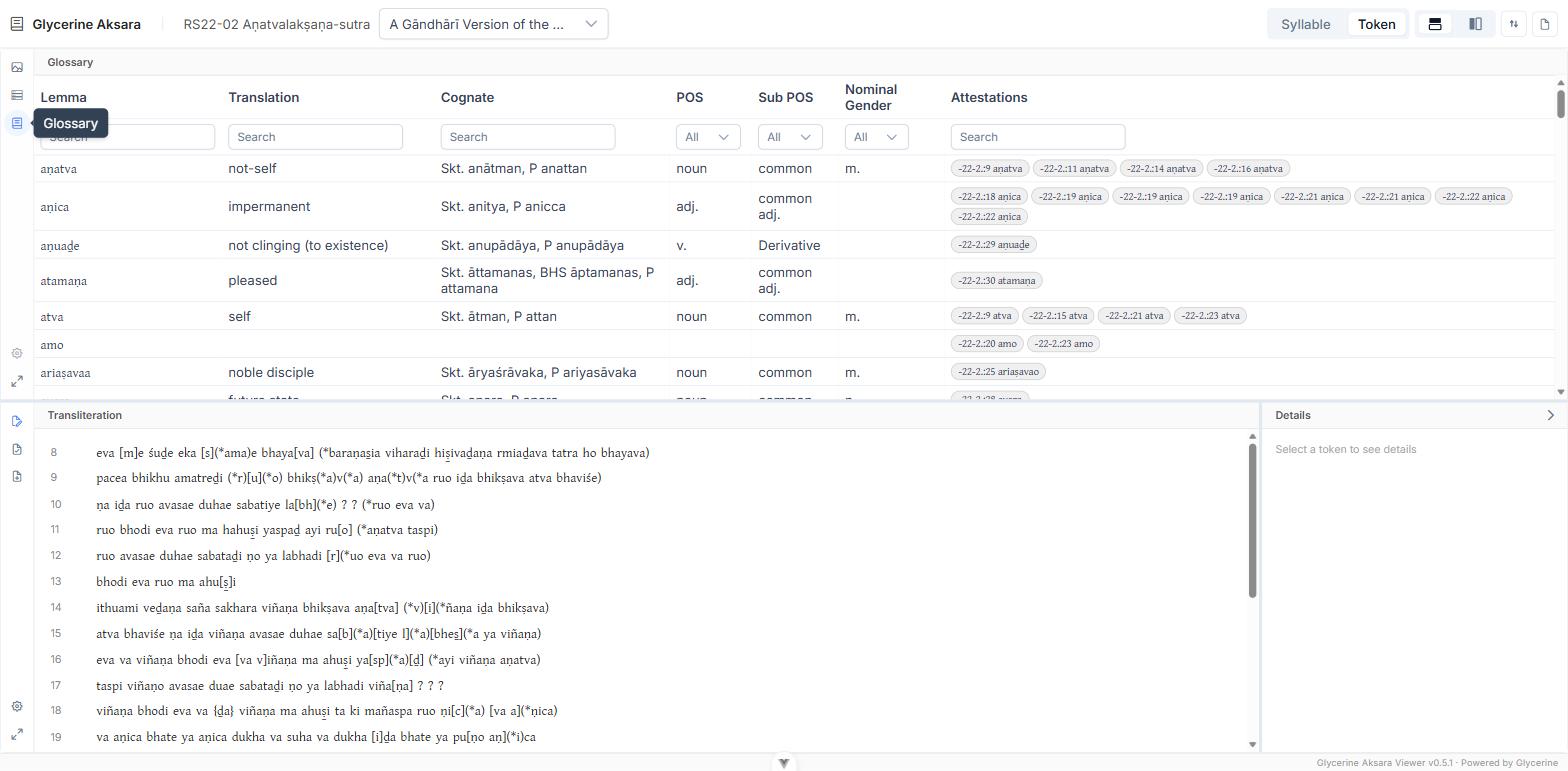
Opening the glossary switches the header to Token scope and clears any selection. Lemmas attach to words, not to single akṣaras, so syllable scope has nothing to say here.
The columns
| Column | Contents |
|---|---|
| Lemma | The headword |
| Translation | Its gloss |
| Cognate | Sanskrit and Pali equivalents |
| POS | Part of speech |
| Sub POS | Subpart of speech |
| Nominal Gender | For nominals |
| Attestations | Every occurrence, as text reference : line plus the attested form |
Entries are sorted by the edition's own sort codes, not by the Latin alphabet — so the order follows Gāndhārī lexicographic convention rather than the accident of transliteration. Lemmas with no attestation in this edition are omitted.
Filtering
The row beneath the headers filters the table, and the filters combine:
- Lemma, Translation, Cognate, and Attestations take free text and match as you type. Searching Attestations matches the attested forms, so you can find every entry attested as viñaṇo specifically.
- POS, Sub POS, and Nominal Gender are dropdowns built from the values actually present in this edition, so they never offer a category that would return nothing. Each has a clear button to reset it.
Selecting
Click a row to highlight every attestation of that lemma at once — in the transliteration, and on the image. Click it again to deselect. This is the fast way to see the distribution of a word through the text.
Click an attestation pill to go to that one occurrence: the text scrolls to it, the image pans to it, and the Viewer changes fragment if needed.
Hovering a pill previews the same highlight without committing to it.
Related
- Word and Lemma Details — the full record for a single word.
- The Edition Report — the glossary as a printable word list.