

Reading the Transliteration
The text pane holds the edition itself: one row per manuscript line, numbered in the margin with the line label the editor assigned. Every syllable in it is a live link to the akṣara it was read from.
Syllable scope and token scope
The Syllable / Token switch in the header decides what a single click means. It changes hovering, selection, highlighting on the image, and the whole content of the Details pane — so it is worth setting deliberately rather than discovering by accident.
| Scope | Clicking selects | The image highlights | Details shows |
|---|---|---|---|
| Syllable | one akṣara | that one akṣara | the akṣara's cut-out and its metadata |
| Token | the whole word | every akṣara of that word | the word's lemma, inflection, and attestations |
Use Syllable scope for paleographic and orthographic questions — what is actually written here. Use Token scope for lexical and grammatical ones — what word is this, and in what form.
Switching scope clears the current selection, since a selected akṣara and a selected word are not the same object.
Sandhi joins
Where a grapheme is shared between two tokens across a sandhi join, it belongs to both. Hovering or selecting either word lights it up.
Following text to image and back
Hover a syllable and the matching akṣara highlights on the image. Click it and the image pans to centre that akṣara — switching to another fragment if the word is there — and the Details pane opens.
It works the same way in reverse: clicking an akṣara on the image scrolls the transliteration to the matching syllable and highlights it. See Navigating the Image.
Clicking anywhere in the text away from a syllable clears the selection.
Display modes
The gear on the text pane toolbar opens Display, with three renderings of the same record:
| Mode | What you get |
|---|---|
| Diplomatic | Only what survives on the surface. Restorations are not spelled out — a lost akṣara appears as a placeholder, so you can see how much is missing without being told what it was. Damage brackets remain. |
| Hybrid | The full apparatus: damage, restoration, insertion, and scribal deletion all marked. This is the default, and the reading to cite. |
| Reconstructed | The editor's text as continuous reading matter. Damage brackets, insertion marks, and deleted material are stripped out; restorations remain in place. |
The same line in all three:
H eva [m]e śuḍe eka [s](*ama)e bhaya[va] (*baraṇaśia viharaḍi hiṣivaḍaṇa rmiaḍava tatra ho bhayava)
R eva me śuḍe eka s(*ama)e bhayava (*baraṇaśia viharaḍi hiṣivaḍaṇa rmiaḍava tatra ho bhayava)
All three are the same annotations, rendered differently — nothing is added or lost by switching, and the selection linking works identically in each. To see them side by side, line for line, use the edition report.
Structure
If the edition defines sequences, the Structure switch reorganises the text: instead of manuscript lines, you get the editor's textual units, nested and labelled, with line references marked inline in the text where the line changes.
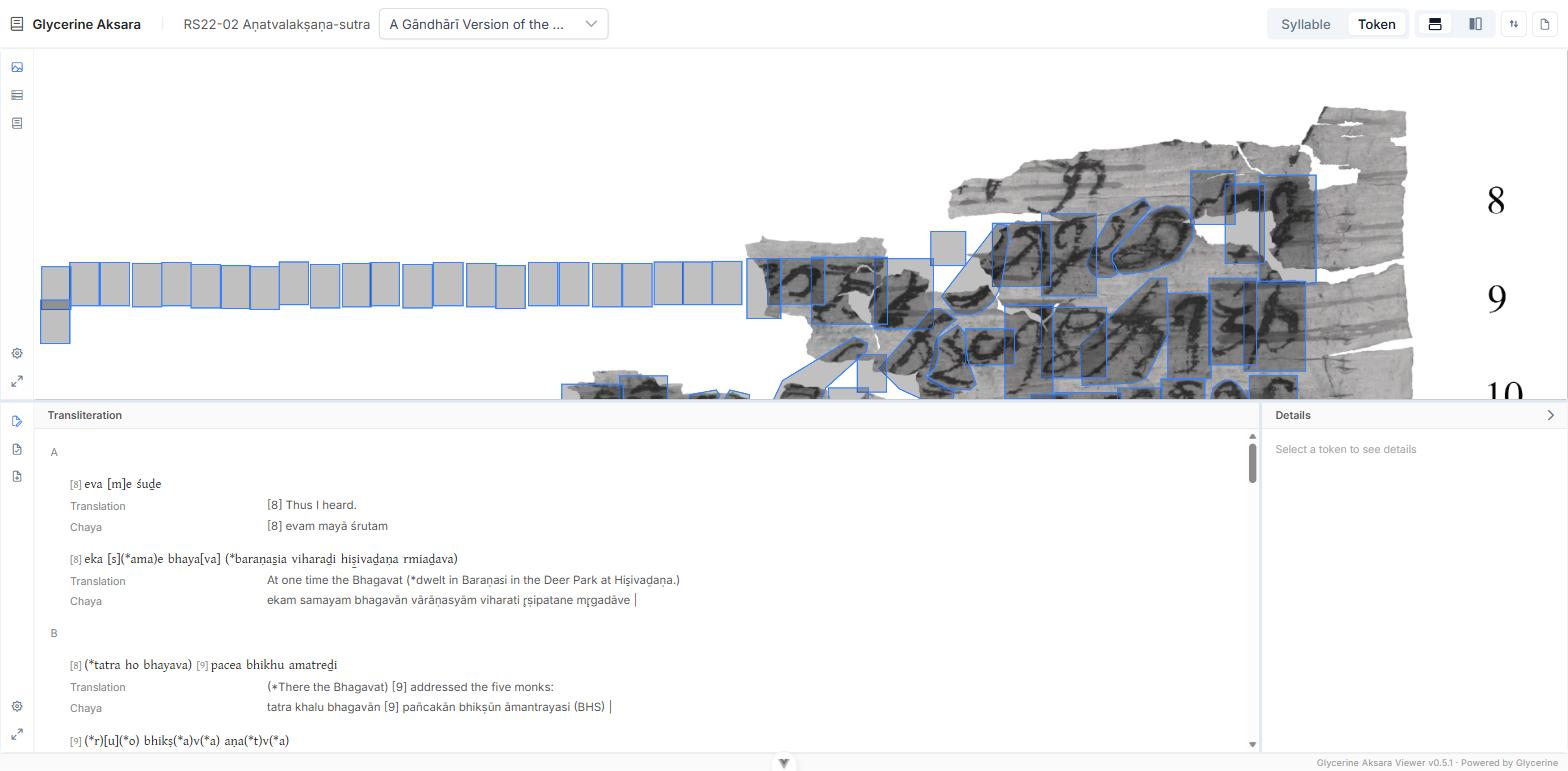
Two further switches, available only while Structure is on:
- Translation — prints the translation of each unit beneath it.
- Chaya — prints the chāyā of each unit beneath it.
Together these give a running edition-translation-chāyā display aligned by textual unit rather than by manuscript line. The switches are greyed out when the edition defines no sequences.
Related
- Translation and Chāyā — reading either as continuous prose.
- Word and Lemma Details — what Token scope puts in the Details pane.
- Akṣaras and Transliteration — the conventions behind the marks.